Python Automation for Beginners: Free Course with Hands-On Projects
Python automation is the practice of turning a repeated computer task into a script you can run again without repeating every click. This free course starts with no programming assumptions and ends with a portfolio-ready reporting tool. You will organize files, clean CSV data, call a web API, add safety controls, schedule a script, and learn how to package the result for a real client.
You do not need a paid course, a powerful computer, or an AI subscription. The core projects use Python’s standard library. You need a computer on which you can install Python, a text editor, and time to practice.
Last reviewed: 9 August 2026 · Level: Complete beginner · Estimated study time: 20–30 focused hours · Cost: Free
Published by Muhammad Azhar for MetaCyberGuru. The scripts, tests, sample data, and downloadable course bundle were run with Python 3.11.5 during the technical review on 9 August 2026. Read more about MetaCyberGuru.
A beginner automation workflow: collect inputs, apply Python rules, organize data, call an API, and produce a report.
What you will be able to do
By the end of the course, you should be able to:
break a repetitive task into input, rules, output, and failure cases;
write small Python programs using variables, conditions, loops, functions, lists, and dictionaries;
work safely with folders and files using pathlib and shutil;
read, validate, clean, and write CSV data;
fetch public JSON data from an API and handle network errors;
turn a script into a command-line tool with logs and a dry-run mode;
test an automation on sample data before it touches real files;
present a finished automation as a portfolio case study; and
scope small automation services without promising results you cannot guarantee.
How this course works
Reading code is not the same as learning to automate. For each lesson, type the example, change one part, break it deliberately, and repair it. The projects are arranged in this order for a reason:
Files: visible input and output make mistakes easy to understand.
CSV data: you learn validation before working with less predictable data.
Web APIs: you add networks, timeouts, rate limits, and external failures.
Command-line tools: you make the script reusable by someone other than its author.
Scheduled work: you learn why unattended automation needs logs and safe defaults.
Keep every project in a separate folder. At the end, those folders become the beginning of your portfolio.
Download the free Python automation course files
The ZIP contains every script used in this course, two sample CSV files, four unit tests, and a README with safe setup commands. Use the supplied synthetic data instead of personal or client records. Download free course files (ZIP)
Tested with Python 3.11.5 on Windows. Scan any downloaded archive with your normal security tools before opening it.
Lesson 0: Set up a clean Python workspace
Python 3.14 is the current stable feature series as of this review and is the recommended installation for new learners. The examples require Python 3.10 or newer because they use modern type-hint syntax. The complete downloadable bundle was tested end to end with Python 3.11.5; other versions were not claimed as tested.
On Windows, select the installer option that adds Python to your path if it is offered.
Open PowerShell, Terminal, or your system’s command prompt.
Check the installation:
python --version
On some Windows systems, use py --version. On some Linux or macOS systems, use python3 --version. Use whichever command reports Python 3.10 or newer, and keep that command consistent in the examples below.
Create the course folder and virtual environment
mkdir python-automation-course
cd python-automation-course
python -m venv .venv
Activate it on Windows PowerShell:
.\.venv\Scripts\Activate.ps1
Activate it on macOS or Linux:
source .venv/bin/activate
A virtual environment keeps each project’s packages separate. These projects do not require third-party packages, but learning this habit now prevents version conflicts later.
The estimate is yours, not a universal productivity claim. Automation work improves when you measure the actual manual process instead of inventing a dramatic number.
Checkpoint
Change the task name, minutes, and run count. Add a new line that calculates annual minutes. If the result is wrong, print each input before changing the formula.
Lesson 1: Think in inputs, rules, outputs, and failures
Most beginner tutorials start with syntax. Automation starts one step earlier: define the job. A useful automation brief fits on one page.
Question
File-organizer example
What is the input?
Files in a test inbox folder
What are the rules?
Group files by extension
What is the output?
Files moved into named subfolders
What may fail?
Duplicate names, locked files, missing folder, no permission
How do we undo it?
Test copy, dry run, and movement log
The key skill is not writing a loop. It is deciding what the loop is allowed to touch.
The small amount of Python you need first
file_names = ["invoice.pdf", "photo.jpg", "notes.txt", "budget.csv"]

groups = {
    ".pdf": "documents",
    ".jpg": "images",
    ".txt": "text",
    ".csv": "data",
}

for file_name in file_names:
    matched_group = "other"

    for extension, folder in groups.items():
        if file_name.lower().endswith(extension):
            matched_group = folder
            break

    print(file_name, "->", matched_group)
This example uses a list for the inputs, a dictionary for the rules, loops to inspect the data, a condition to make a decision, and a variable to store the result. That is enough to model a surprising number of office tasks.
Exercise: write an automation brief
Choose one task you repeat. Do not code it yet. Write the five answers from the table. Good first tasks include renaming downloaded invoices, validating a contact list, creating a weekly text report, or checking a set of public URLs.
Avoid automating a task that deletes originals, sends messages, changes money, or edits production data as your first project.
Lesson 2: Work with paths and files safely
Python’s pathlib module represents filesystem paths as objects. It is easier to read than manually joining strings with slashes, and it handles Windows and Unix-style path rules for you.
from pathlib import Path

inbox = Path("practice_inbox")
inbox.mkdir(exist_ok=True)

for file_path in inbox.iterdir():
    if file_path.is_file():
        print(file_path.name, file_path.suffix.lower())
Path("practice_inbox") is relative to the folder from which you run the script. During practice, that is safer than pointing at your real Downloads folder.
The safe workflow previews every proposed move before copied practice files are sorted into extension-based folders.
Mini project 1: a file organizer with dry-run mode
Create a folder named practice_inbox. Put copies of a few harmless files inside it. Then save this as organize_files.py:
from pathlib import Path
import shutil

SOURCE = Path("practice_inbox")
DRY_RUN = True

FOLDERS_BY_EXTENSION = {
    ".csv": "data",
    ".docx": "documents",
    ".jpg": "images",
    ".jpeg": "images",
    ".pdf": "documents",
    ".png": "images",
    ".txt": "text",
}


def unique_destination(destination: Path) -> Path:
    """Return a path that will not overwrite an existing file."""
    if not destination.exists():
        return destination

    counter = 1
    while True:
        candidate = destination.with_name(
            f"{destination.stem}_{counter}{destination.suffix}"
        )
        if not candidate.exists():
            return candidate
        counter += 1


def organize(source: Path, dry_run: bool = True) -> None:
    if not source.exists():
        raise FileNotFoundError(f"Folder does not exist: {source.resolve()}")

    for item in source.iterdir():
        if not item.is_file():
            continue

        folder_name = FOLDERS_BY_EXTENSION.get(item.suffix.lower(), "other")
        destination_folder = source / folder_name
        destination = unique_destination(destination_folder / item.name)

        print(f"{'WOULD MOVE' if dry_run else 'MOVING'}: {item} -> {destination}")

        if not dry_run:
            destination_folder.mkdir(exist_ok=True)
            shutil.move(str(item), str(destination))


if __name__ == "__main__":
    organize(SOURCE, dry_run=DRY_RUN)
Run it once with DRY_RUN = True. Read every proposed move. Only then switch it to False and run it on the practice folder.
Why this version is safer than the usual tutorial script
It ignores subfolders, so it does not reorganize its own output.
It checks that the source exists before doing work.
Dry-run mode shows the plan without changing files.
It creates destination folders only when a real move happens.
It generates a new filename instead of silently overwriting a duplicate.
The moving logic is inside a function, which makes later testing easier.
Practice upgrades
Add .xlsx and .webp rules.
Create a rule that sends unknown extensions to other.
Skip hidden files whose names begin with a dot.
Write each completed move to moves.log.
Replace the extension rules with year-and-month rules based on file modification time.
Lesson 3: Clean CSV data without hiding bad rows
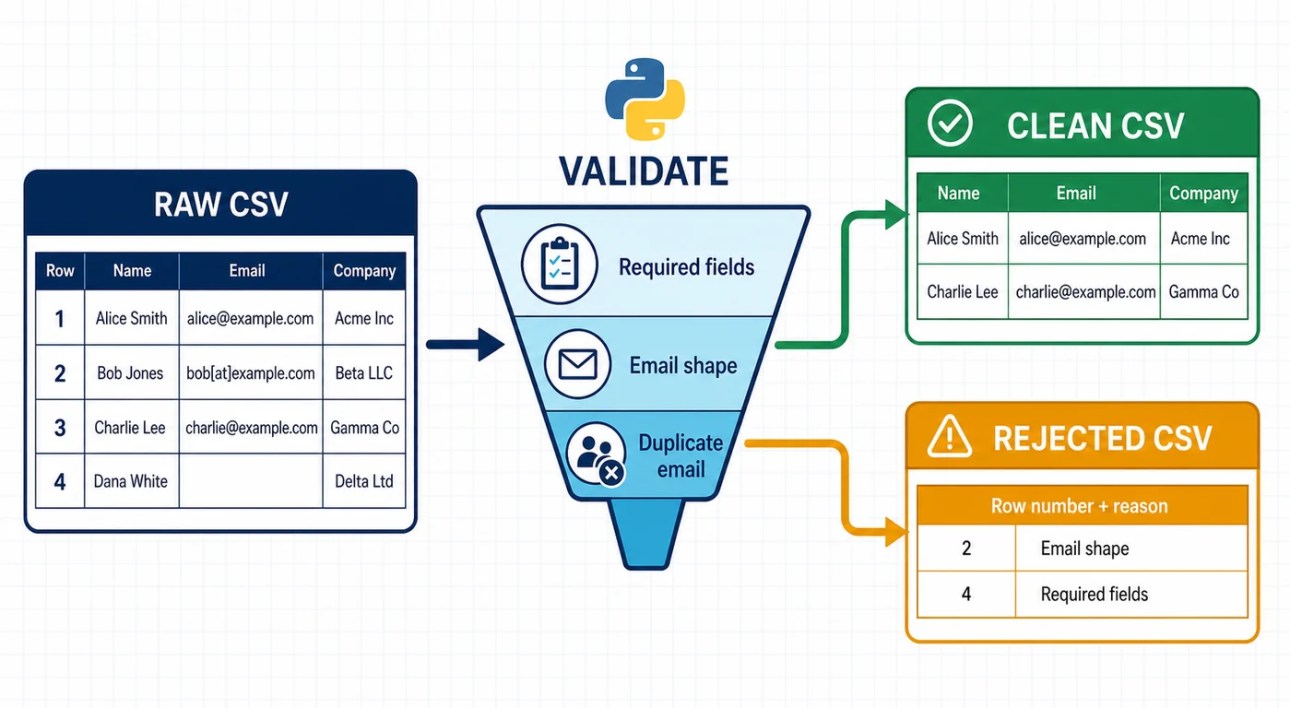
CSV automation is paid work in disguise. Small organizations export customer lists, inventory, expenses, survey results, and order histories as CSV files. The hard part is not reading rows. It is deciding what counts as valid, keeping rejected data visible, and preserving the original.
A useful CSV cleaner produces both a clean file and a rejected-row audit trail instead of silently dropping bad records.
Create contacts.csv:
name,email,city
  Ayesha Khan  ,AYESHA@example.com,karachi
Bilal Ahmed,bilal@example.com,Lahore
No Email,,Islamabad
Duplicate Ayesha,ayesha@example.com,Karachi
Save this as clean_contacts.py:
from pathlib import Path
import csv

INPUT_FILE = Path("contacts.csv")
CLEAN_FILE = Path("contacts_clean.csv")
REJECTED_FILE = Path("contacts_rejected.csv")


def normalize_name(value: str) -> str:
    return " ".join(value.strip().split()).title()


def normalize_city(value: str) -> str:
    return " ".join(value.strip().split()).title()


def normalize_email(value: str) -> str:
    return value.strip().lower()


def looks_like_email(value: str) -> bool:
    local, separator, domain = value.partition("@")
    return bool(local and separator and "." in domain)


def clean_contacts(input_file: Path) -> tuple[int, int]:
    accepted = []
    rejected = []
    seen_emails = set()

    with input_file.open("r", encoding="utf-8-sig", newline="") as source:
        reader = csv.DictReader(source)
        required = {"name", "email", "city"}

        if not reader.fieldnames or not required.issubset(reader.fieldnames):
            raise ValueError(f"CSV must contain these columns: {sorted(required)}")

        for row_number, row in enumerate(reader, start=2):
            clean_row = {
                "name": normalize_name(row["name"]),
                "email": normalize_email(row["email"]),
                "city": normalize_city(row["city"]),
            }

            reason = ""
            if not clean_row["name"]:
                reason = "missing name"
            elif not looks_like_email(clean_row["email"]):
                reason = "invalid email"
            elif clean_row["email"] in seen_emails:
                reason = "duplicate email"

            if reason:
                rejected.append({**clean_row, "row_number": row_number, "reason": reason})
                continue

            seen_emails.add(clean_row["email"])
            accepted.append(clean_row)

    with CLEAN_FILE.open("w", encoding="utf-8", newline="") as destination:
        writer = csv.DictWriter(destination, fieldnames=["name", "email", "city"])
        writer.writeheader()
        writer.writerows(accepted)

    with REJECTED_FILE.open("w", encoding="utf-8", newline="") as destination:
        fields = ["name", "email", "city", "row_number", "reason"]
        writer = csv.DictWriter(destination, fieldnames=fields)
        writer.writeheader()
        writer.writerows(rejected)

    return len(accepted), len(rejected)


if __name__ == "__main__":
    accepted_count, rejected_count = clean_contacts(INPUT_FILE)
    print(f"Accepted: {accepted_count}")
    print(f"Rejected: {rejected_count}")
The rejected file is not a failure. It is an audit trail. A client can correct those rows instead of wondering why records disappeared.
What this validator does not prove
The looks_like_email function catches obvious mistakes. It does not prove that an address exists, belongs to the person named, or can receive mail. Good automation labels its certainty accurately.
Checkpoint
<
ul>
What happens if the CSV uses Email instead of email…1418 tokens truncated…lure, bad input, and recovery.
Use this reliability checklist
Sample first: test on copied data in a separate folder.
Preserve the source: write a new output file unless in-place editing is essential.
Dry run: preview changes before applying them.
No silent overwrite: stop, version, or rename when the destination exists.
Idempotency: running the tool twice should not duplicate work or corrupt output.
Validate boundaries: check required columns, allowed extensions, date formats, and destination paths.
Handle expected errors: report a locked file differently from a programming bug.
Log decisions: record what was accepted, rejected, moved, or skipped.
Keep secrets outside code: read tokens from environment variables or an approved secret store.
Least privilege: give the script access only to the folder or account it needs.
A small automated test
Save this as test_clean_contacts.py beside clean_contacts.py:
import unittest
from clean_contacts import looks_like_email, normalize_city, normalize_email
class ContactCleanerTests(unittest.TestCase):
def test_email_is_normalized(self):
self.assertEqual(normalize_email(" USER@Example.COM "), "user@example.com")
def test_obvious_bad_email_is_rejected(self):
self.assertFalse(looks_like_email("not-an-email"))
def test_city_spacing_is_cleaned(self):
self.assertEqual(normalize_city(" islamabad "), "Islamabad")
if __name__ == "__main__":
unittest.main()
Run the tests:
python -m unittest -v
Three tests do not make the cleaner perfect. They protect three decisions from being accidentally changed later. Add tests when you discover a real edge case.
Final project: build an expense-report automation
The final project turns a raw CSV export into two outputs: a clean rejected-row log and a category summary. It demonstrates file handling, CSV validation, functions, logging, command-line arguments, and safe output behavior.
The final automation validates each row, totals accepted expenses, records rejected rows separately, and leaves a run log.
write expense_summary.csv and expense_rejected.csv;
refuse to overwrite output unless the user passes --force; and
log a count of accepted and rejected rows.
Save this as expense_report.py:
from collections import defaultdict
from datetime import date
from decimal import Decimal, InvalidOperation
from pathlib import Path
import argparse
import csv
import logging
SUMMARY_FILE = Path("expense_summary.csv")
REJECTED_FILE = Path("expense_rejected.csv")
REQUIRED_COLUMNS = {"date", "description", "category", "amount"}
logging.basicConfig(
filename="expense_report.log",
level=logging.INFO,
format="%(asctime)s %(levelname)s %(message)s",
)
def parse_args() -> argparse.Namespace:
parser = argparse.ArgumentParser(description="Create a category expense report from CSV.")
parser.add_argument("input", type=Path, help="Source expense CSV")
parser.add_argument("--force", action="store_true", help="Overwrite existing outputs")
return parser.parse_args()
def validate_row(row: dict[str, str], row_number: int) -> tuple[dict | None, dict | None]:
cleaned = {key: (value or "").strip() for key, value in row.items()}
try:
parsed_date = date.fromisoformat(cleaned["date"])
except ValueError:
return None, {**cleaned, "row_number": row_number, "reason": "invalid date"}
try:
amount = Decimal(cleaned["amount"])
except InvalidOperation:
return None, {**cleaned, "row_number": row_number, "reason": "invalid amount"}
if not cleaned["description"]:
return None, {**cleaned, "row_number": row_number, "reason": "missing description"}
if not cleaned["category"]:
return None, {**cleaned, "row_number": row_number, "reason": "missing category"}
return {
"date": parsed_date.isoformat(),
"description": cleaned["description"],
"category": cleaned["category"].title(),
"amount": amount,
}, None
def read_expenses(input_file: Path) -> tuple[list[dict], list[dict]]:
accepted = []
rejected = []
with input_file.open("r", encoding="utf-8-sig", newline="") as source:
reader = csv.DictReader(source)
headers = set(reader.fieldnames or [])
if not REQUIRED_COLUMNS.issubset(headers):
missing = sorted(REQUIRED_COLUMNS - headers)
raise ValueError(f"Missing required columns: {missing}")
for row_number, row in enumerate(reader, start=2):
good, bad = validate_row(row, row_number)
if good:
accepted.append(good)
if bad:
rejected.append(bad)
return accepted, rejected
def ensure_outputs_are_safe(force: bool) -> None:
existing = [path for path in (SUMMARY_FILE, REJECTED_FILE) if path.exists()]
if existing and not force:
names = ", ".join(path.name for path in existing)
raise FileExistsError(f"Output exists: {names}. Use --force to replace it.")
def write_summary(expenses: list[dict]) -> None:
totals = defaultdict(Decimal)
for expense in expenses:
totals[expense["category"]] += expense["amount"]
with SUMMARY_FILE.open("w", encoding="utf-8", newline="") as destination:
writer = csv.DictWriter(destination, fieldnames=["category", "total"])
writer.writeheader()
for category in sorted(totals):
writer.writerow({"category": category, "total": f"{totals[category]:.2f}"})
def write_rejected(rows: list[dict]) -> None:
fields = ["date", "description", "category", "amount", "row_number", "reason"]
with REJECTED_FILE.open("w", encoding="utf-8", newline="") as destination:
writer = csv.DictWriter(destination, fieldnames=fields)
writer.writeheader()
writer.writerows(rows)
def main() -> None:
args = parse_args()
if not args.input.is_file():
raise FileNotFoundError(f"Input file not found: {args.input}")
ensure_outputs_are_safe(args.force)
accepted, rejected = read_expenses(args.input)
write_summary(accepted)
write_rejected(rejected)
logging.info("Accepted rows: %s; rejected rows: %s", len(accepted), len(rejected))
print(f"Accepted rows: {len(accepted)}")
print(f"Rejected rows: {len(rejected)}")
print(f"Summary: {SUMMARY_FILE.resolve()}")
print(f"Rejected rows: {REJECTED_FILE.resolve()}")
if __name__ == "__main__":
main()
Run it:
python expense_report.py expenses.csv
If you have checked the old output and intend to replace it:
python expense_report.py expenses.csv --force
Final-project acceptance test
Do not call the project finished until all of these are true:
A valid four-row sample produces the expected category totals.
An invalid date goes to the rejected file with its source row number.
An invalid amount does not crash the whole run.
A missing required column stops before writing output.
Existing output is preserved unless --force is present.
Negative amounts are handled according to the rule you document.
The README explains the input columns, command, outputs, and limitations.
Schedule a script only after it is observable
Scheduling is the last step, not the first. An unattended script needs a fixed working directory, absolute input paths, logs, safe output behavior, and a clear failure signal.
On Windows, Task Scheduler can start the Python executable and pass the full script path as an argument. On Linux and many Unix-like systems, cron can run a command on a schedule. Test the exact command manually from the same account before scheduling it.
A scheduled automation that silently fails is worse than a manual checklist because people stop looking for the missing work.
Build a portfolio that proves the skill
A portfolio entry needs more than a screenshot of code. Show the problem and the evidence that your program handles it.
For each project, include:
a short problem statement;
sample input containing no real personal or client data;
the rules and known limitations;
the command needed to run it;
sample output;
a safety note describing dry runs, backups, and overwrite behavior;
tests or an acceptance checklist; and
a two-minute screen recording if it makes the workflow easier to understand.
Never publish client data, credentials, private URLs, production logs, or a client's code without written permission.
Realistic ways this skill can become paid work
Python automation can support paid work, but learning the syntax does not guarantee income. Clients pay for a reliable result attached to a business problem.
Service
Useful proof
Main risk to clarify
CSV cleanup and validation
Before/after sample plus rejected-row report
What counts as valid
File renaming and organization
Dry-run output and collision handling
Backup and rollback
Recurring report generation
Sample report and logged run
Changing input format
Public API data collection
Cached output and error handling
Terms, limits, and API changes
Migration helper
Mapping rules and test dataset
Data loss and reversibility
How to scope a small automation job
Ask for a redacted sample input before quoting the work.
Write the rules in plain language and get agreement on ambiguous cases.
Define the output files and what happens to rejected records.
State what the script will not do.
Deliver a dry run or test result before touching live data.
Include setup instructions and a short support boundary.
Automating a vague process: if humans disagree on the rule, the code cannot resolve it by magic.
Using the real folder first: a test copy is cheaper than file recovery.
Hiding rejected data: skipped records need a reason and a path back to review.
Copying code without changing it: change the sample input, add a rule, and explain the output in your own words.
Adding packages too early: first learn what Python already provides; add a dependency when it makes the solution meaningfully clearer.
Putting secrets in the script: source code gets copied, shared, and committed.
Scheduling before logging: unattended code must leave evidence.
Selling “Python” instead of an outcome: a client understands “clean these exports every Friday” more easily than “I write Python scripts.”
Knowledge check
Why is --apply safer than a --dry-run option?
What is the difference between validating an email's shape and proving that the mailbox exists?
Why should network requests have a timeout?
What makes an automation idempotent?
Which information should never appear in logs?
What evidence would make a CSV-cleaning portfolio project credible?
Suggested answers
The default behavior makes no change; the user must explicitly request the move.
Shape validation catches obvious formatting errors but does not contact or verify the mailbox.
A timeout prevents a failed or slow service from blocking the program indefinitely.
Repeating it with the same input does not duplicate work or damage the result.
Passwords, tokens, private records, confidential file contents, and unnecessary personal data.
A redacted sample, documented rules, rejected-row output, repeatable command, and tests or acceptance checks.
Frequently asked questions about Python automation
Do I need to know Python before starting?
No. Lesson 0 starts with installation and a first script. You will progress faster if you type and change each example instead of only copying it.
Is this Python automation course completely free?
Yes. The lessons, sample code, project files, exercises, and reference links are free. The course does not require a paid Python package or AI subscription.
Which Python version should I use?
Install Python 3.14 if you are starting now. The examples require Python 3.10 or newer, and the downloadable bundle was tested with Python 3.11.5.
How long does the course take?
Plan for roughly 20–30 focused hours if you complete the exercises and final project. Your time will vary according to your existing command-line and programming experience.
Does the course include a certificate?
No. MetaCyberGuru does not currently issue a certificate for this course. The portfolio projects, README files, tests, and sample outputs are the evidence you can show.
Which Python automation projects will I build?
You will build a file organizer, CSV contact cleaner, public API report, reusable command-line tool, tests, and a final expense-report automation.
Can I use the projects in my portfolio?
Yes. Change the sample data, add at least one useful feature, document your decisions, and explain the limitations. Never upload client data or credentials.
What to learn next
Do not jump straight from file scripts to a large AI system. Choose the next layer based on the work you want to do:
More reliable scripts: learn deeper testing, type hints, packaging, and Git.
Business data: learn SQL, spreadsheet formats, and data analysis.
Python fundamentals change slowly, while API behavior and tooling change faster. This course should be reviewed every six months and whenever Python enters a new stable feature series or GitHub changes the API behavior used by the project.
Share this page
Share this page with the people who will use it next.




Discussion
No comments yet. Add the first useful question or observation.
You must log in to post a comment.